|
|
Spotfire Analyst/Desktop
Analyst requires Spotfire Server to publish online. Desktop
- analyse without publishing. Empower colleagues to ask & answer
their own questions - from anywhere. TIBCO Spotfire Analyst makes
it easy to build & deploy reusable analytic applications over the web
or perform ad-hoc analytics, driven on-the-fly by your own knowledge,
intuition & desire to answer the next question. Spotfire analytics
does all this by letting you interactively query, visualise, aggregate,
filter & drill into datasets of virtually any size. Ultimately you will
reach faster insights with Spotfire & bring clarity to business
issues or opportunities in a way that gets all the decision-makers on
the same page quickly.
To create web-based Spotfire analytic applications, users of Spotfire
Analyst simply save their work on the Spotfire Server. There is no
separate publishing step and no need for IT programming. Spotfire
Consumer analysts only need a compatible browser – no plug-ins or
installers to run, as it is a true zero-footprint client.
Pricing? Please call +61 2 9233 6888 or
email
What's New
in Spotfire 7.7 (PDF)

Spotfire
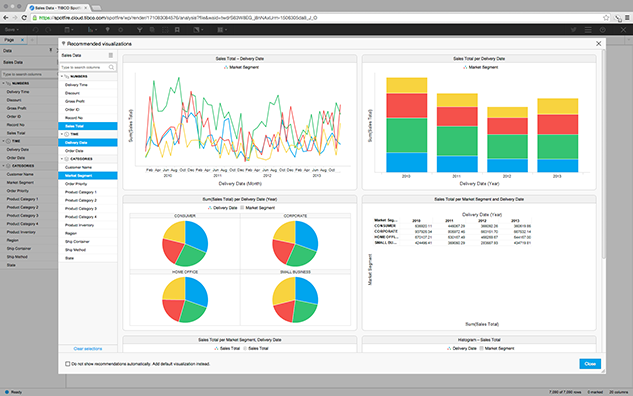
Recommendations will automatically suggest visualisations from your
data! With a single click see how your data
looks in different visualistations and choose the most impactful
representation.
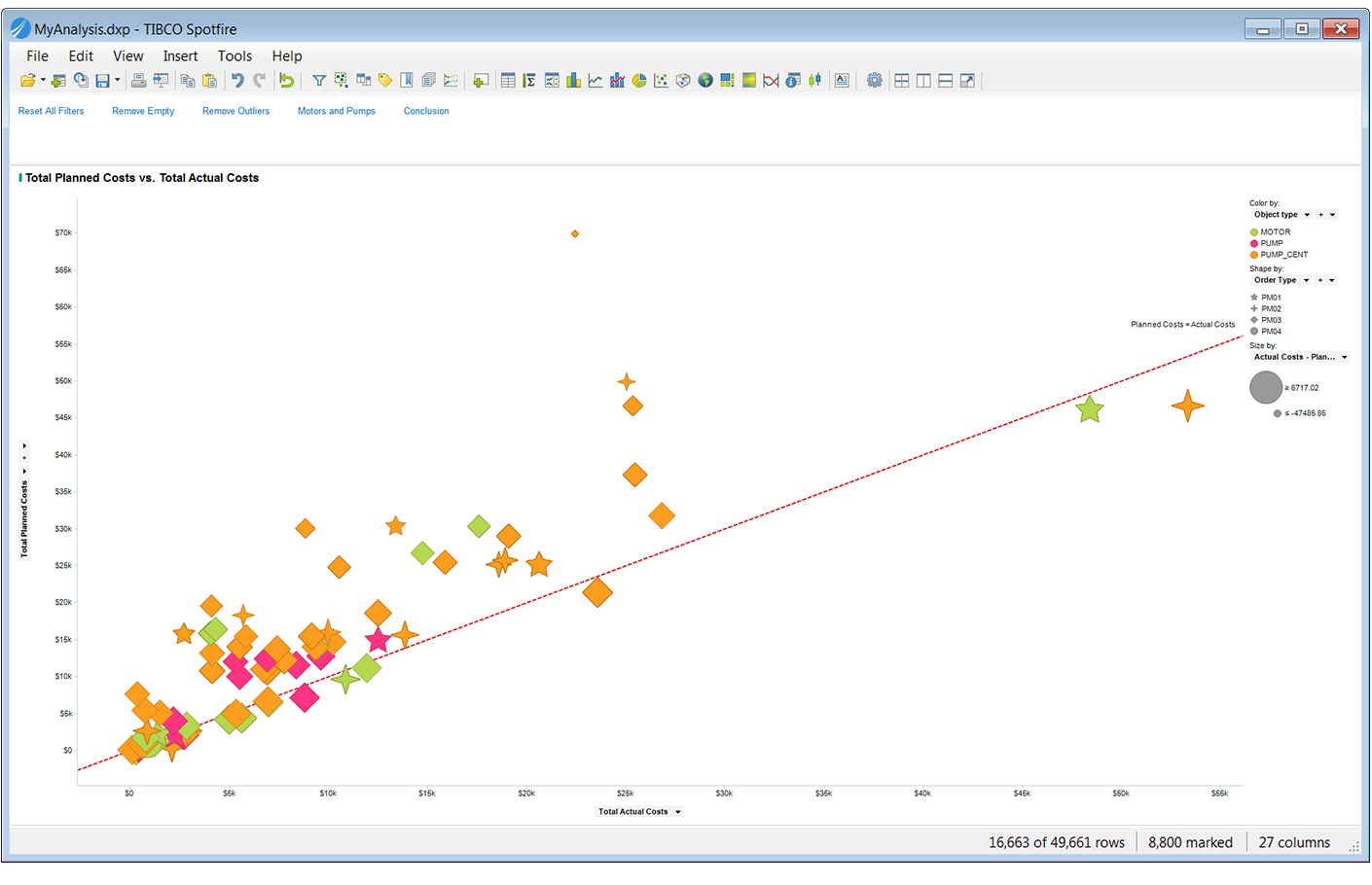
Spotfire Desktop lets you quickly mashup multiple datasets into a
single, visual experience.Data to dashboards
in minutes
Mark interesting moments or filter out
distractions with Spotfire Desktop and see patterns emerge from your
data.
Spotfire bookmarks allow you to
capture moments along your data journey. Use bookmarks to retrace
steps or export them to eloquently communicate a complex idea.
Tell a story with
data: CCreate a guided experience
through your data. Add descriptions, images, and step-by-step navigation
that bring it to life.

Key Features
- Richly interactive analytic interface for accessing &
manipulating data, composing analyses, and publishing to web users
- Configured around the data you load in to freely explore and
visualize; no need to model or pre-conditioning the data, and no
need to worry about “dimensions” or “measures”
- Analyse multiple different datasets in one application
- Roll-up and aggregate values on the fly or filter-down or drill
into the smallest details of interest
- Link back to a data source to access up-to-the-moment data from
an immense variety of relational and enterprise data stores
- Elegant and configurable visuals: Bar chart, Map chart, Line
chart, Pie chart, Scatter plot, Combination Bar/Line chart,
Cross Table, 3D Scatter Plot, Treemap, Heat Map, Parallel
Coordinates plot
- Add-on focused analytic toolkits for network analytics,
microarray analysis, chemistry research, and more
- With S+,
Miner, R, Matlab & SAS,
Spotfire Analyst users can apply powerful quantitative methods
& statistical tools to add additional rigor to an analysis. By
compiling these functions into Guided Analytic applications, more
analytically sophisticated users & analysts are
able to configure and deliver workflows that are visually intuitive and
easily interpretable to much broader audiences. (Statistics
Services add-on)
- Export your findings directly to Microsoft PowerPoint® or richly
formatted HTML
- A deep, well-documented API makes it easy to extend Spotfire to
address your custom needs for data access, web service integration,
custom visualization, and much more
- Distribute analyses to colleagues using
TIBCO Spotfire Consumer.
Easily publish work to anyone with a browser.
Demo Gallery
|
System
Requirements |
View Spotfire
Product Tour
Spotfire
4.5 enhancements:
Discover
actionable insights hidden in Big Data & Extreme Information
- Access, visualize & mashup Big Data, using a new connector to
Hadoop, with data from enterprise applications such as
SalesForce.com, Oracle, SAP, and others
- Combine a “Google-like” search-based exploration model with a
visualization-based approach to data discovery using Attivio’s
Active Intelligence Engine™ (AIE™)
Deliver powerful, predictive analytics across the enterprise
- Anticipate business events using an expanded library of
pre-packaged predictive models directly from core
Spotfire platform
- Access the SAS and MATLAB® statistical engines
directly from Spotfire without scripting (in addition to S+ & R)
Create
branded mobile apps quickly and easily
- Speed time to market by quickly deploying
branded mobile apps to Apple iPad
- Customise mobile apps without coding/publish to Apple App Store
Monitor and control the Spotfire platform with greater efficiency
- Gain comprehensive real-time systems monitoring & greater control across multiple Spotfire Servers
& Consumers
- Simplified installation, management & upgrade of Spotfire Server
Contextual, Social
Collaboration (V4.0)
- Interact with analyses in social media platforms, business
processes & existing portals
- Leverage your collective intelligence, using tibbr, Sharepoint,
iPad, etc & rapidly drive collaboration, insight, alignment & action
Analytic Dashboards for
Everyone (V4.0)
- Empower users to instantly focus on vital information & take
fast & informed action.
Analytic dashboards speed decision making by providing key metrics at a
glance, while enabling quick drill down capability. Gain instant insight
into KPI’s and detect trends early through powerful interactive features
such as dynamic values, sparklines, and conditional icon
Spotfire
Version 3.3 enhancements -
PDF
-
Collaborative bookmarks -
enables users to capture all
dashboard elements (markings, drop down selections, etc) and then
share them with a single click so others can see in an instant a
precise moment of insight.
-
Free native iPad
application - Publish once; use anywhere
(desktop, browser, or mobile). Download the iPad app here.
-
Multiple visual
enhancements - include the horizontal bar chart, cross table
customisations, time series & missing values compensation, improved labeling, hollow markers
etc
-
Smart mappings of data
sources:
Information Services enables administrators and power users to
automatically generate 1-to-1 mappings of existing tables & columns in Data Sources. This time saving improvement further
encourages a self-service approach throughout the general user
population, which will be better able to enjoy these quickly created
mappings as preconfigured queries, for example.
System Requirements
|
TIBCO
Spotfire Analyst 7.5.x System Requirements |
|
Processor |
Minimum: 2 GHz, 2-Cores
Recommended:4 Cores or more (Intel Core i5 or equivalent), 2+ GHz, 64-bit |
|
RAM |
Minimum: 4 GB
Recommended: 8 GB or
greaterLarge datasets can require more RAM. |
|
Hard disk space |
10 GB of free space
for installation and normal use. |
|
Display |
Recommended:
1366*768 pixel resolution or higher, 16 or 32-bit color depth.
Minimum: 1024x768 pixel resolution, 16 or 32-bit color depth.
For functionality that require hardware acceleration (such as
the 3D plot), DirectX 9 or higher and a compatible graphics card
is required. |
|
Software |
|
|
Operating System |
Microsoft Windows
10, 8, 8.1, 7 NOTE: NOTE: While both 32- and 64-bit Operating Systems are supported,
64-bit is strongly recommended. Running TIBCO Spotfire Analyst on a 32-bit Operating System (or in 32-bit mode)
is only suitable when using in-Database analytics or with small data sets. From version 6.0, TIBCO Spotfire Analyst is only optimized for use with 64-bit systems.. |
|
TIBCO Spotfire
Software |
Connection to a
TIBCO Spotfire Server 7.5.x, with a TIBCO Spotfire 7.5.x
deployment, for software deployment and licensing. |
|
TIBCO Spotfire (for
Upgrades) |
Existing TIBCO
Spotfire (Client) installations of version 3.3.x or higher can
be upgraded to version 7.0.x by connecting to a TIBCO Spotfire
Server 7.5.x, with a TIBCO Spotfire 7.5.x deployment |
|
Installation
Permissions |
Administrator rights
are not required to install TIBCO Spotfire |
|
Web Browser |
Microsoft Internet
Explorer 10, 11 |
|
Microsoft .NET
Framework |
TIBCO Spotfire
supports Microsoft .NET Framework version 4.5, 4.6 and requires that
Microsoft .NET Framework be installed prior to installing TIBCO
Spotfire.
If Microsoft .NET Framework 4.5 isn't installed when running
the TIBCO Spotfire Client 7.5.x installer, the installer can (if
the users accepts this when prompted) download and install it.
No such option is available when upgrading older, existing TIBCO
Spotfire installations by connecting to a TIBCO Spotfire Server
with a TIBCO Spotfire 7.5.x deployment though - in this case,
Microsoft .NET Framework 4.5 must be installed before upgrading.
NOTE: Microsoft .NET Framework 4.5.2 (or higher) is
strongly recommended, as defects in older .NET Framework 4.5.x
versions have been confirmed to cause stability issues.
NOTE: Microsoft .NET Framework 4.5 works side by side
with older Framework (3.5 and earlier) versions, but performs an
in-place update for .NET Framework 4.
NOTE: Microsoft .NET Framework requires Administrator
rights to complete installation.
Click
here
to download Microsoft .NET Framework 4.5.2 |
|
Transport Layer
Security |
Microsoft OfficeTLS 1.1 or higher. NOTE: Only required if connecting to the TIBCO Spotfire Server over HTTPS NOTE: TLS 1.1 (and/or higher versions) can be enabled in the Internet Explorer > Internet Options > Advanced tab > Security section. |
|
Microsoft Office
(Optional) |
Microsoft Office 365
Microsoft Office
2013, 32- and 64-bit versions
Microsoft Office 2010, 32- and
64-bit versions
Microsoft Office 2007NOTE: Microsoft Office needs to be installed in order to
use Spotfire functionality that integrates with Office products
(such as importing data from Excel or Access, or exporting to
Powerpoint)
NOTE: It is possible to import data from Microsoft Access
databases into TIBCO Spotfire. For 64-bit Operating Systems,
please note that Microsoft didn't introduce 64-bit drivers until
Microsoft Office 2010. |
|
Connectors
(Optional) |
The following are
the supported (Data) Connectors:
TIBCO Spotfire Connector for
Amazon Redshift 4.5
TIBCO Spotfire Connector for Apache Spark SQL 4.5
TIBCO Spotfire Connector for Cloudera Hive 4.5
TIBCO Spotfire Connector for Cloudera Impala 4.5
TIBCO Spotfire Connector for Composite Information Server 4.5
TIBCO Spotfire Connector for Hortonworks 4.5
TIBCO Spotfire Connector for HP Vertica 4.5
TIBCO Spotfire Connector for IBM DB2 4.0
TIBCO Spotfire Connector for IBM Netezza 4.5
TIBCO Spotfire Connector for Microsoft SQL Server 4.5
TIBCO Spotfire Connector for Microsoft SQL Server Analysis Services 4.5
TIBCO Spotfire Connector for OData 4.5
TIBCO Spotfire Connector for Oracle 4.5
TIBCO Spotfire Connector for Oracle Essbase 4.5
TIBCO Spotfire Connector for Oracle MySQL 4.5
TIBCO Spotfire Connector for Pivotal Greenplum 4.5
TIBCO Spotfire Connector for Pivotal HAWQ 4.5
TIBCO Spotfire Connector for PostgreSQL 4.5
TIBCO Spotfire Connector for Salesforce.com 4.5
TIBCO Spotfire Connector for SAP HANA 4.5
TIBCO Spotfire Connector for SAP NetWeaver Business Warehouse 4.5
TIBCO Spotfire Connector for Teradata 4.5
TIBCO Spotfire Connector for Teradata Aster 4.5
Connector System requirements can be found
here. |
|
Importing SAS data
files (Optional) |
SAS Providers for
OLE DB 9.22 or higher
It is possible to import SAS data files (*.sas7bdat, *.sd2,
*.sd7) into TIBCO Spotfire directly. The requirement for this
functionality is that the SAS Providers for OLE DB 9.22
or higher must first be installed on the client machine.
Click
here
to download SAS Providers for OLE DB (free registration on SAS
website required).
NOTE: SAS Providers for OLE DB are not supported for use in
Spotfire Web Player (the SAS driver is not thread-safe, which
can cause general platform instabilities) |
|
Citrix (Optional) |
It is supported to
deploy TIBCO Spotfire on:
Server:
Citrix XenApp 7, 6.5, 6.0, 5.0
Operating System:
Windows Server 2008 R2, SP1 or higher
NOTE: The 3D Scatter Plot is not supported in a Citrix
environment since the plot requires hardware acceleration. |
|
Remote Desktop
Services (Optional) |
It's supported to
run TIBCO Spotfire via Windows Server Remote Desktop Services on
the following Operating System(s): Windows Server 2012 R2, 2012, 2008 R2 |
|
TIBCO Tibbr
(Optional) |
TIBCO Tibbr 4 or
higher |
|